


Smart Sleep Coach by Pampers™
4.2135.00 Reviews
App Specs
- Version
- 1.6.9
- Updated On
- License
- Free
- Downloads
- 100,000+
- Developer
- P&G BABY CARE DIGITAL LLC
- Categories
- Parenting
- Platform
- Android, iOS
Screenshots

 Analysis by AppCompare
I judge baby sleep tools less by how polished their promises sound and more by whether they make a tired caregiver’s next decision easier. Smart Sleep Coach by Pampers™ is a free parenting app from P&G BABY CARE DIGITAL LLC, built around sleep guidance and tracking for babies. Its appeal is the attempt to turn observations about one child into practical suggestions, rather than leaving parents with a blank diary and a pile of advice to sort through alone.
That approach can be useful, but it also asks for participation. The app is most convincing when a caregiver can log sleep consistently and treat recommendations as ideas to consider, not rules that every baby must follow. I would look at it as a planning aid for routines and patterns, not as a substitute for a parent’s judgment or professional help when a health concern is involved.
Readability and navigation in tired moments
When I first opened the app, the bright, friendly presentation made it feel approachable rather than clinical. Setup asks for basic details about a baby, including age and sleep habits, so the guidance can be tailored instead of staying entirely general. That is a sensible starting point: a newborn’s routine is not the same as an older baby’s, and advice is more useful when it reflects the child it is meant to support.
The first-use experience is straightforward, but there is a trade-off between personalization and effort. Parents need to enter information for the app to build a useful picture, and that can feel like one more task in a day already full of feeding, settling, and caregiving. I’d start with the details I can reliably provide rather than trying to make every entry perfect. A workable record is more valuable than an elaborate one that becomes too tiring to maintain.
The app has a 4.3 average from around 1.4 thousand ratings, and it has passed 100 thousand installs. Those figures suggest it has found an audience, but they cannot tell me whether its routines will suit a particular household. I would use the first stretch of tracking to see whether the suggestions fit my baby and family, rather than judging the app by a single difficult night.
How the sleep tools fit real family life
I look at the sleep tools through the lens of ordinary family routines: the most helpful plan is one a tired caregiver can actually keep up with. In this section, I focus on how tracking and guidance can support small decisions without turning bedtime into a project. That practical balance also matters when considering the effort of using the app while holding or soothing a baby.
Motor and sensory considerations
The core interaction is logging and reading, so the most important practical question is whether those steps remain manageable when a caregiver is tired or holding a baby. Keeping a simple habit helps: enter a sleep period when there is a calm moment, or jot down the time elsewhere and transfer it later if using the phone immediately would interrupt settling. That small change can reduce the pressure to operate the app during a stressful wake-up.
Worth Reading Before You Choose

EA SPORTS FC Mobile 26 Is a Bigger Football Game, but It Takes Time

Flipboard Shows What News Apps Must Do Beyond the Feed

Switching to Android Auto Means Rethinking Your Driving Routine

Google Calendar Makes a Crowded Week Easier to Manage

Ludo King Makes the Most of the Minutes Between Plans

Baby Panda World Brings Quick Play to Modern Phones, but Its Game Library Feels Busy
The app also offers soothing music and bedtime stories, which give families options beyond looking at schedules. These can be useful parts of a familiar wind-down, but they are not a guaranteed way to calm every child. Some babies respond to a repeated story or gentle sound; others settle better with less stimulation, or with a caregiver’s usual routine. I would try one element at a time and keep it only if it seems to help this particular child.
Sleep advice can also be emotionally loaded. If a suggested routine does not fit a baby’s temperament, a caregiver’s sensory needs, or a household’s daily rhythm, it should not become another reason to feel that something is being done wrong. I find it healthier to treat the plan as a reference point: notice what seems practical, adapt it, and set aside what adds stress without helping.
Situational access: when tracking helps
A realistic use case is a parent who has noticed frequent night waking but cannot remember whether it happens at roughly the same time. Logging sleep over several days can make that pattern easier to see. The resulting record gives the caregiver something concrete to discuss with a partner or bring into a conversation with a qualified professional, while the app’s educational material can help explain why a routine change might be worth trying.
It may also help when two caregivers share bedtime duties. A consistent record can give both people a clearer view of what happened, instead of relying on a tired recollection the next morning. The practical tip is to agree on a simple logging approach before dividing the work: if one person records every detail and the other records only wake-ups, the pattern may be harder to interpret. A shared, realistic standard matters more than exhaustive notes.
Smart Sleep Coach is free to download, with in-app purchases priced from $29.99 to $119.99 per item. I would check the purchase screen carefully before committing, and decide first whether the free experience already fits the family’s needs. The app is rated for Everyone, has a minimum operating-system requirement of version 9, and its current version is 1.6.8. It was released on January 10, 2024. Those details are useful when checking device compatibility and deciding whether the cost of any optional purchase makes sense for your budget.
What it does well—and where it can frustrate
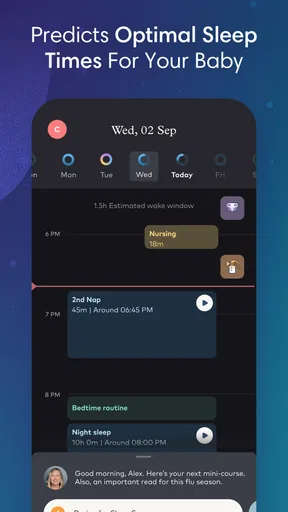
The main strength is the connection between tracking, tailored sleep plans, and explanations of sleep patterns. Instead of simply collecting times, the app aims to turn them into suggestions about bedtime routines and naps. I found that combination more useful than a bare diary would be, especially for a caregiver who wants to understand the reasoning behind a change rather than follow an unexplained instruction.
There is a real learning curve in keeping the record complete enough to be useful. Middle-of-the-night logging can be awkward, and missed entries may make a short-term pattern look less clear. One practical workaround is to focus on consistency over precision: use the same rough method each day, and avoid turning uncertain times into exact-looking entries. The goal is to notice broad trends, not to make a perfect scientific record.
The community forums may offer reassurance through other parents’ experiences, but other families’ solutions are not automatically right for your baby. I would use them for perspective and companionship, not as a replacement for individualized medical guidance. The same caution applies to sleep-science explanations: useful context can support a decision, but a general plan cannot account for every health, feeding, temperament, or household circumstance.
Compared with a basic notes app or paper sleep diary, Smart Sleep Coach offers more structure and connects the record to personalized suggestions and education. A simple diary, however, may be the better choice for someone who wants minimal screen time, no guided plan, or complete control over how entries are organized. General parenting forums can provide conversation, but they are less focused than a dedicated sleep tracker and may make it harder to separate personal anecdotes from guidance. I see this app as a middle ground for parents who want both a record and help interpreting it.
Remaining barriers and who should choose another approach
The app is not an ideal fit for every caregiver. If logging itself feels burdensome, a simpler shared note or a few observations written down during the day may be more sustainable. If a family’s schedule changes constantly, a suggested routine may feel like another demand rather than support. And if a baby’s sleep difficulty is part of a medical or feeding concern, an app should not be treated as the answer; a qualified health professional is the more appropriate person to consult.
Families should also consider how they want to handle phone use around sleep. A caregiver trying to keep bedtime quiet may prefer to record information later instead of opening an app beside the crib. The music and stories can be part of a routine, but they are optional tools, not requirements for getting value from the tracking and educational content. Choosing only the parts that suit the household is a reasonable way to avoid adding unnecessary stimulation.
For accessibility in everyday situations, I would not assume that a friendly visual style makes every interaction easy for every person. A caregiver with limited dexterity, low vision, difficulty concentrating while sleep-deprived, or a need to reduce screen exposure should try the basic workflow on their own device before relying on it. If entering information is uncomfortable, another caregiver can help maintain the record, or a simpler method can preserve the useful observations without forcing someone through an inconvenient interface.
Inclusive verdict
Overall, Smart Sleep Coach is best for parents who want a guided way to notice sleep patterns and are willing to make regular, manageable entries. The personalized plans, tracking, educational material, music, stories, and parent forums give it several ways to support a routine, while still leaving room for a family to decide what actually works. I would not recommend treating its plan as a fixed schedule or expecting an app to resolve every difficult night.
If you want a structured companion and can spare a little time for tracking, it is worth trying. If you need a very lightweight record, prefer not to use a phone at bedtime, or find logging stressful, a paper diary or shared note may suit you better. My advice is to begin with a small, consistent set of observations, use the guidance as a prompt rather than a command, and keep only the features that make family life calmer. That is where this app has the most practical value.
First things first, downloading and setting up the Smart Sleep Coach by Pampers™ was a breeze. Available on both Android and iOS, the app greets you with a bright, friendly interface that makes you feel like you're already in good hands. The setup process involves entering some basic info about your little one, like their age and sleep habits. This helps the app tailor its advice specifically to your baby. Pretty neat, huh?
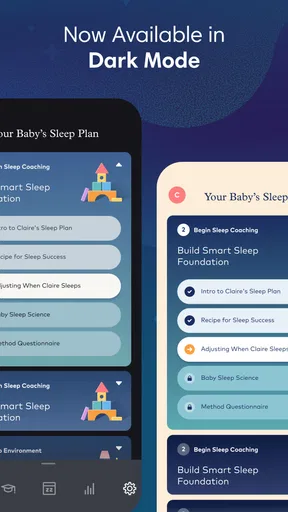
The app is all about creating a personalized sleep plan, offering suggestions that adapt as your baby grows and changes. It felt a bit like having a sleep consultant in my pocket, ready to dish out wisdom whenever I needed it. The smart insights and tips are based on sleep science, which is reassuring when you’re desperate for something that works.
Features That Stand Out
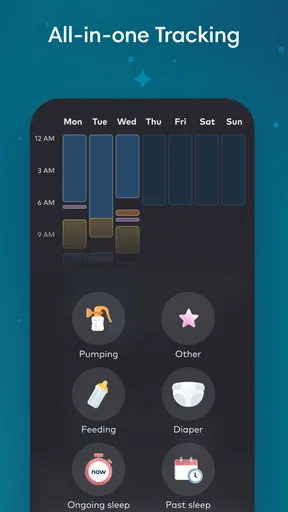
What really caught my attention were the sleep tracking and customized sleep plans. The sleep tracker is a lifesaver. It lets you log sleep patterns, helping you spot trends and make adjustments. Trust me, seeing those patterns can be eye-opening. I realized my little one was waking up at almost the same time every night, something I hadn’t noticed before!
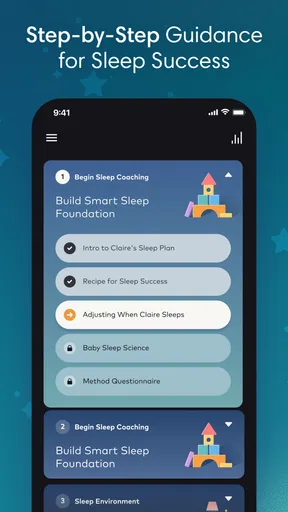
The customized plans are like having a roadmap for sleep success. These plans adjust based on the data you input, offering tips on everything from bedtime routines to nap schedules. And speaking of routines, the app includes a soothing music library and a selection of bedtime stories to help calm your little one before sleep. It’s like having a mini Spotify just for bedtime.
Adapting and Learning
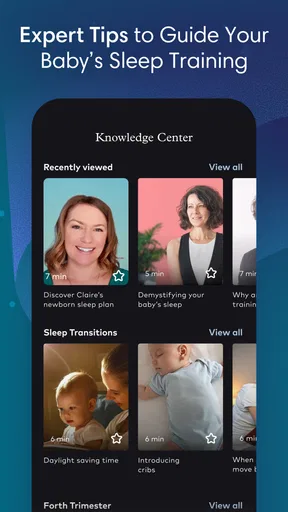
One of the coolest things about the app is its ability to adapt. As your child’s sleep patterns evolve, so does the advice. It’s like the app grows up with your baby. The use of sleep science is apparent, and the app provides educational content to help you understand why certain strategies work. I found myself learning a lot about the stages of sleep and how to encourage more of that precious deep sleep.
Beyond the science, the app feels genuinely supportive. There’s a community aspect, too, with forums where you can connect with other parents. Sharing experiences and tips with fellow sleep-deprived parents can be a real comfort.
Handling the Challenges
Of course, not everything is a walk in the park. The app requires consistent input to be truly effective. Logging sleep can become a bit of a chore, especially during those groggy, middle-of-the-night wake-ups. But if you can stick with it, the insights are well worth the effort.
Another thing to keep in mind is that no app can completely solve sleep issues. It’s a tool, not a magic wand. There will still be nights when nothing seems to work, and that’s okay. The app is there to support you, not replace your intuition as a parent.
Final Thoughts
All in all, the Smart Sleep Coach by Pampers™ is a handy tool for any parent looking to improve their baby’s sleep habits. Its user-friendly design, personalized advice, and sleep education make it a valuable resource. While it requires some dedication to input data regularly, the payoff in sleep insights can be quite rewarding.
If you’re searching for a way to get a bit more rest and are willing to invest some time into tracking and learning, this app might just be your new best friend. Give it a shot and see if those sleepless nights start to dwindle. Sweet dreams!
Pros
- Easy-to-use interface for seamless navigation.
- Personalized sleep plans tailored for your baby.
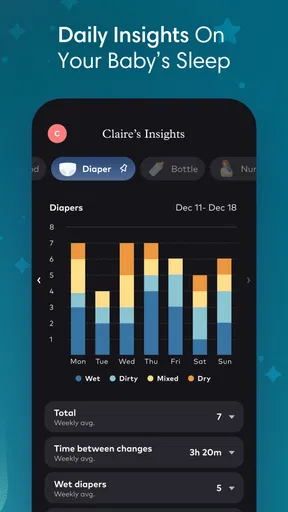
- Tracks sleep patterns with detailed analytics.
- Offers expert tips and advice for better sleep.
- Integrates with smart devices for enhanced monitoring.
Cons
- Requires a subscription for full feature access.
- Limited offline functionality.
- May have occasional syncing issues.
- Some features require specific devices.
- Not available in all languages.
FAQs for Smart Sleep Coach by Pampers™
What features does Smart Sleep Coach by Pampers™ offer?
Smart Sleep Coach by Pampers™ provides personalized sleep coaching plans tailored to your child's age and sleep patterns. It includes tracking tools, sleep analytics, and expert tips to help improve your child's sleep habits. Additionally, it offers a progress tracker and bedtime routine management to ensure consistent sleep development.
Is the app suitable for all age groups?
While Smart Sleep Coach by Pampers™ is primarily designed for infants and toddlers, it can also be beneficial for preschool-aged children. The app customizes its sleep plans based on the specific needs of each age group, ensuring that the guidance provided is age-appropriate and effective.
Does Smart Sleep Coach require an internet connection?
Yes, Smart Sleep Coach by Pampers™ requires an internet connection to access personalized sleep plans, track progress, and receive updates. The app syncs data across devices and provides real-time analytics and tips, which necessitate an active connection to function optimally.
How user-friendly is the app for new parents?
Smart Sleep Coach by Pampers™ is designed with new parents in mind, featuring an intuitive interface and easy-to-navigate menus. The app offers clear instructions and step-by-step guidance, making it accessible even for those who are not tech-savvy. Its user-friendly design ensures a smooth experience for all users.
Is there a subscription fee for Smart Sleep Coach?
Yes, Smart Sleep Coach by Pampers™ operates on a subscription model, offering a free trial period for new users. After the trial, users can choose from various subscription plans that best suit their needs. The subscription provides access to all features, including personalized coaching and expert tips.


